It may be easiest to delete your ccc-i email account first.
    Create a new email account, but select Microsoft Exchange.  Log in with your ccc-i.com email and new Microsoft password.
    If you have already set up your email certificates, you shouldn't need to do anything else.

    For more help, go to the Microsoft help page for creating email accounts on iOS Mail app.
Thunderbird for Windows, Linux, and Macs
Click button to show instructions on setting up email on Thunderbird
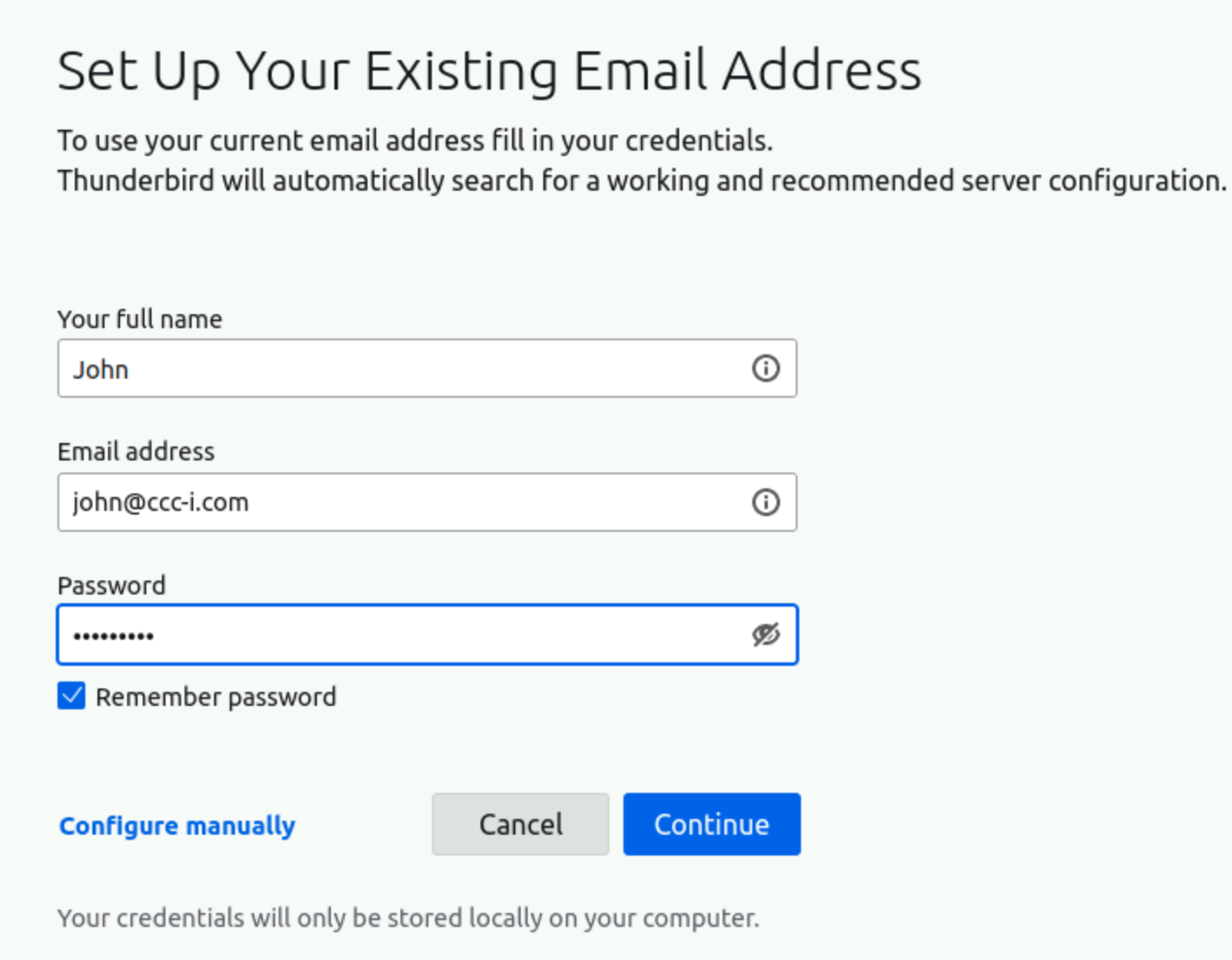
    Enter your name, email, and password.  Click "Configure manually".


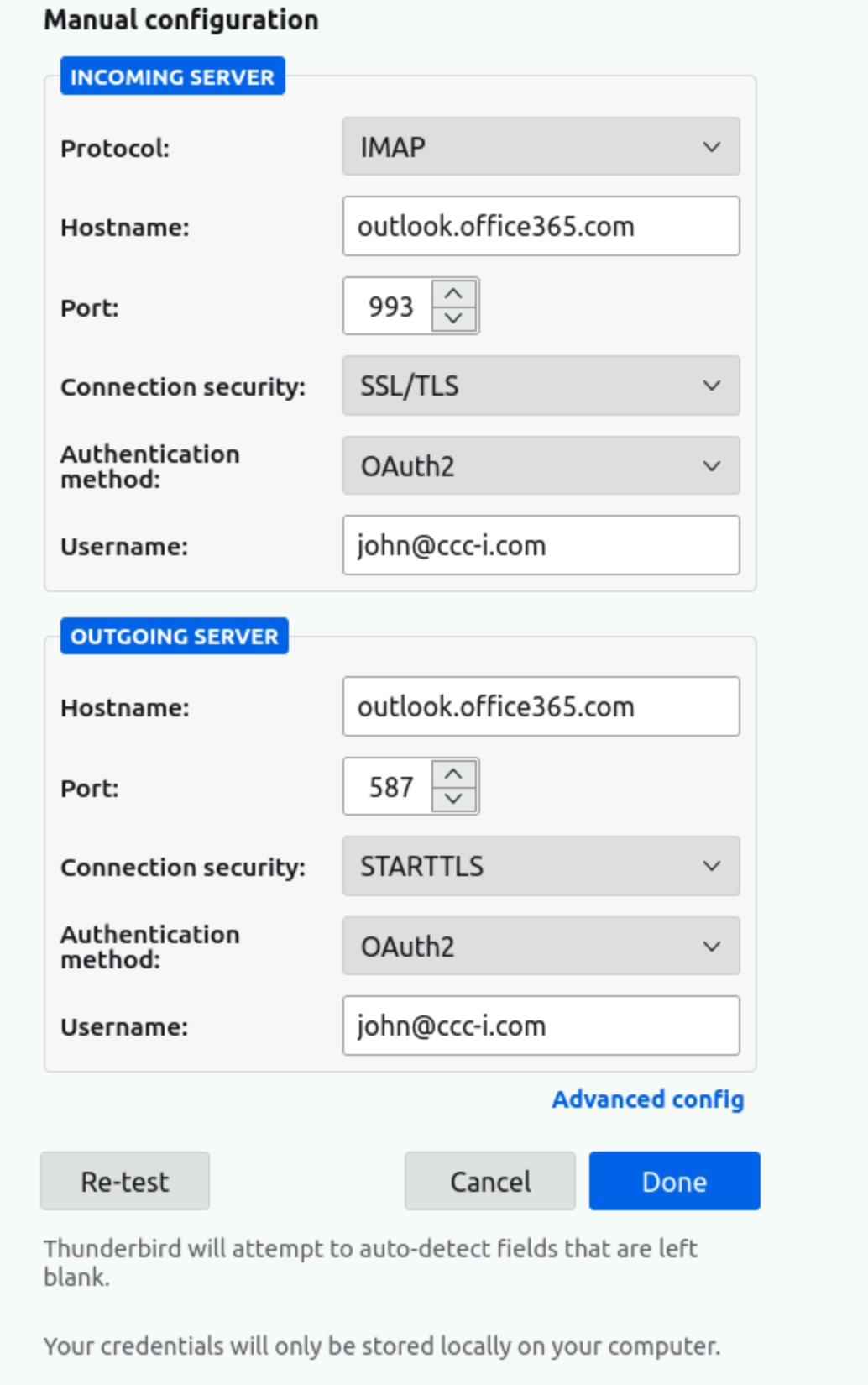
    Under Incoming server, enter hostname outlook.office365.com, port 993, ssl/tls, and authentication method to Oauth2, username to your email
    Under Outgoing server, enter hostname outlook.office365.com, port 587, STARTTLS, and authentication method to Oauth2, username to your email
    Note:  if Oauth2 isn't in the dropdown list, click the Re-test button after filling in the other values.
    Click Done when finished.


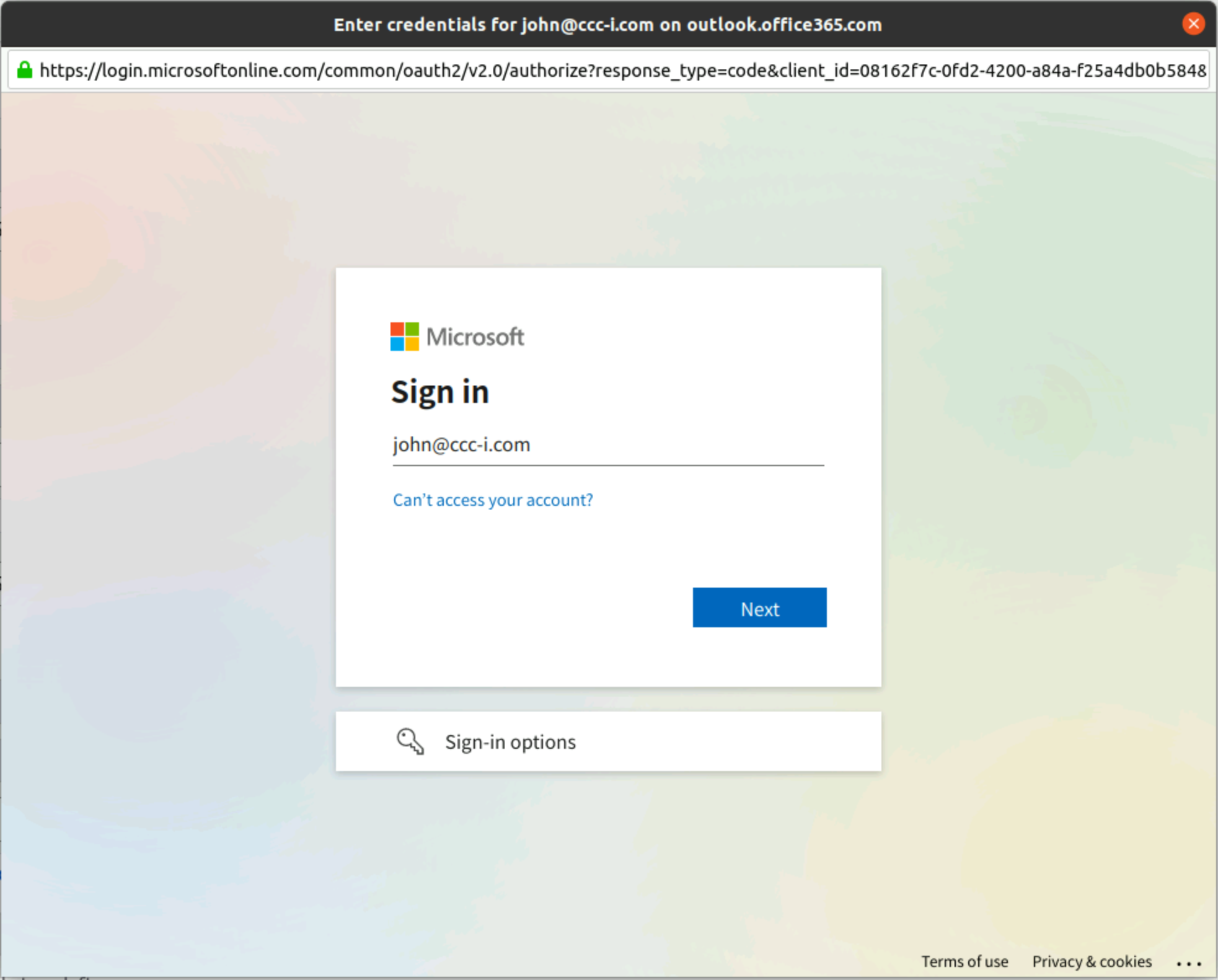
    A window should prompt you to sign into your Microsoft account.  Enter your email address and password.


    In your account settings, click on  End-to-End encryption and select your S/MIME certificates for signing and encryption.  Check "Require encryption by default"


    Note:  Microsoft automatically copies emails you send to your Sent Items folder on their server.  If you see two copies of emails you send in your Sent Items folder
    in Thunderbird, you can uncheck the "Place a copy in" option in Copies & Folders under your email account or you can specify a different folder in Thunderbird to store your sent emails.
Outlook.com using browser (except Edge)
You will be able to login to Outlook, but you can only send and read unencrypted email.
Outlook.com using Edge browser
    It's a bit involved, but you can install an Edge extension that will let you view and send encrypted email. To start, login to outlook.com and
    sign in to your email account.  At the top right, click the gear icon and then the View all Outlook settings link at the bottom of the popup window.

    Click Mail->S/MIME.  You should see a link to install the S/MIME control.  After installing, restart your browser.

    Find the extension "Microsoft S/MIME" by clicking the puzzle shaped icon at the top right of Edge or click the three dots at the top right and click Extensions.

    Click on Extension options

    Check the option for "Other work or school website domains. For example, if you sign in to Outlook on the web with https://mail.contoso.com/mail, then type "mail.contoso.com" in the box below."
    Add ccc-i.com to the text box and click Save.  Restart your browser.

    Now you will need to load the CCCi CA certificate, your ccc-i.com .p12 certificate, and the public certificates of your intended recipients.

    To encrypt an email, click the three dots next to Discard and select "Show message options..".

    Note: when sending an email, only check the "Encrypt this message".  Don't check the "Digitally sign this message" option since it returns an error.
Outlook for Windows
    First you will need to load the CCCi CA certificate, your ccc-i.com .p12 certificate, and the public certificates of all recipients you will need.

    Open Outlook, go to File->Options
    Click on Trust Center
    Click on Trust Center Settings
    Click on Email Security
    Under Encrypted email, click on Settings
    Choose your Signing and Encryption Certificates (click Choose and find your certificate you installed in step 1)
    Check both Default Security Settings
    Give it a name
    Click Ok
Outlook Mobile app for Android
    You can install the Outlook app from the Play store and set up your email account(s).  In order to encrypt/decrypt messages,
    you will need your PKCS#12 file (often called .p12 or .pfx), which is a file that holds both your private key and certificate.

    Since it must be manually installed in Outlook from email, you can fool the app by creating a new
    email, attaching your .p12 to it, and then clicking the attached .p12 file to begin the installation process.  You must know the
    password assigned to your .p12.  It will be given to you when you request your .p12 file.

    https://techcommunity.microsoft.com/t5/exchange-team-blog/how-to-configure-s-mime-in-office-365/ba-p/584516
Outlook Mobile app iPhone
    You can install the Outlook app from the Apple store and set up your email account(s).  In order to encrypt/decrypt messages,
    you will need your PKCS#12 file (often called .p12 or .pfx), which is a file that holds both your private key and certificate.

    Since it must be manually installed in Outlook from email, you can fool the app by creating a new
    email, attaching your .p12 to it, and then clicking the attached .p12 file to begin the installation process.  You must know the
    password assigned to your .p12.  It will be given to you when you request your .p12 file.

    https://techcommunity.microsoft.com/t5/exchange-team-blog/how-to-configure-s-mime-in-office-365/ba-p/584516
Coastal Webmail
    Now works with the new Microsoft Oauth2 authentication.

    Coastal Webmail link

    Note: added a link to the login page to log you out completely from Horde and your Microsoft account.  Use if you have any problems logging in.
Mac mail
Information on setting up email and certificates on MacBooks is available here
Notes:
    Check your Junk email folder often.  Microsoft seems much more aggressive at flagging legitimate email as junk.

    Microsoft has lots of options you may find useful.  For example, you can create rules for automatically moving incoming emails to different folders.

    Each account gives you access to the online versions of Word, Excel, Powerpoint, and more.  You also have 1TB storage on OneDrive.
 Coastal Email help